
If you open ChatGPT, type a few words like a Google search, read the first answer and close the tab — you're getting maybe a tenth of what it can do. Not because you're doing anything wrong, exactly. It's just that ChatGPT isn't a search engine. It's more like a very capable assistant, waiting for you to actually tell it what you need.
This guide is the one mindset shift that changes everything — in plain English, with before-and-after examples you can copy today. No jargon, no setup.
The habit that's holding you back
Google trained all of us to type as few words as possible. "best laptop 2026." "chicken recipe." "tax deadline." It works, because Google's job is to find a page someone else already wrote.
ChatGPT works the opposite way. It doesn't find an answer — it writes one, just for you, based on what you tell it. So the less you say, the more it has to guess. And when it guesses, you get the bland, generic reply that made you think "eh, this AI thing is overrated."
See the difference for yourself
Here's the exact same goal, asked two ways. Notice how little extra effort the second one takes — and how much better the result is.
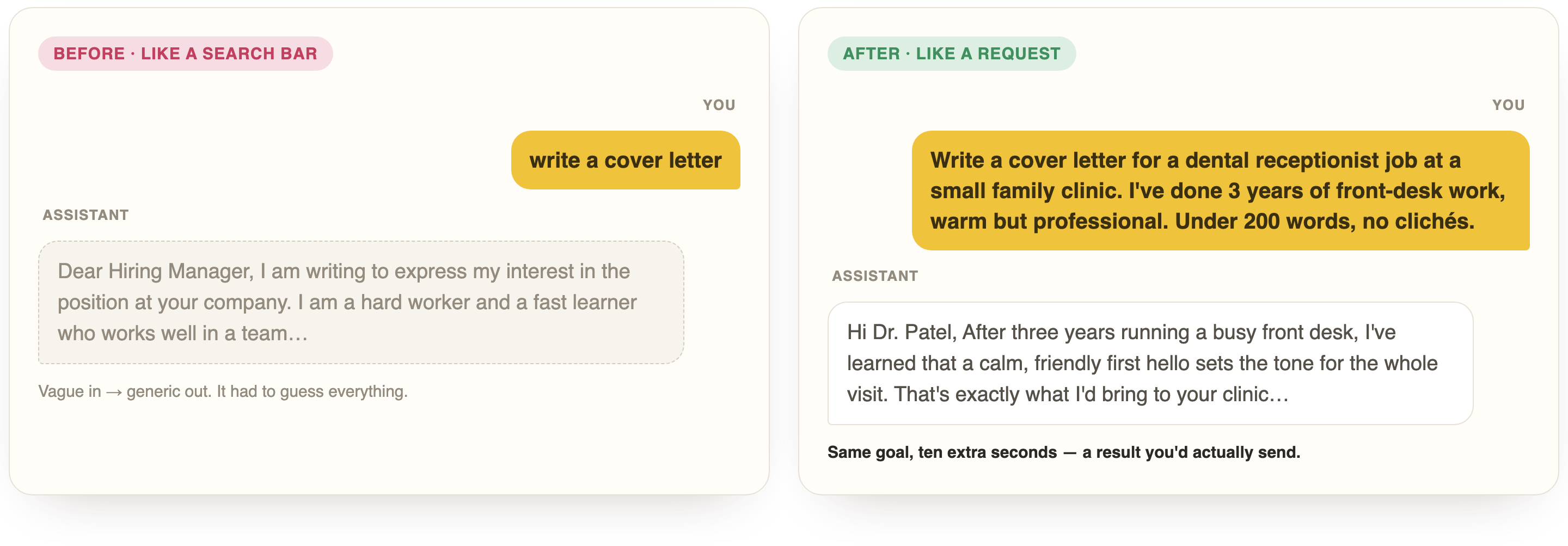
The second version didn't take an expert. It just added three things ChatGPT can't guess: who you are, what it's for, and what "good" looks like to you.
The 3 things to add to almost any request
You don't need a framework or a cheat sheet. Before you hit enter, just check that you've told it three things:
- Who it's for (or who you are). "I'm a nurse with 5 years' experience," or "this is for busy parents."
- What you actually want it to do. Not "help with my email" — "write a polite reply that says no but keeps the door open."
- What good looks like. Length, tone, format: "three short bullet points, friendly, no jargon."
That's it. Add those three and you've already left most people behind.
Then — don't walk away
The biggest thing beginners miss: the first answer is a draft, not the final word. You're in a conversation, so just keep talking to it:
Make it shorter and a bit warmer.
That third point isn't quite right — here's what I actually meant…
Every follow-up gets you closer, because now ChatGPT has more of your context. This back-and-forth is where the magic actually lives — not in the first reply.
Make ChatGPT interview you
If you take only one thing from this guide, take this. Paste this line before any bigger request:
Before you answer, ask me any questions you need until you're confident you can give me a great result.
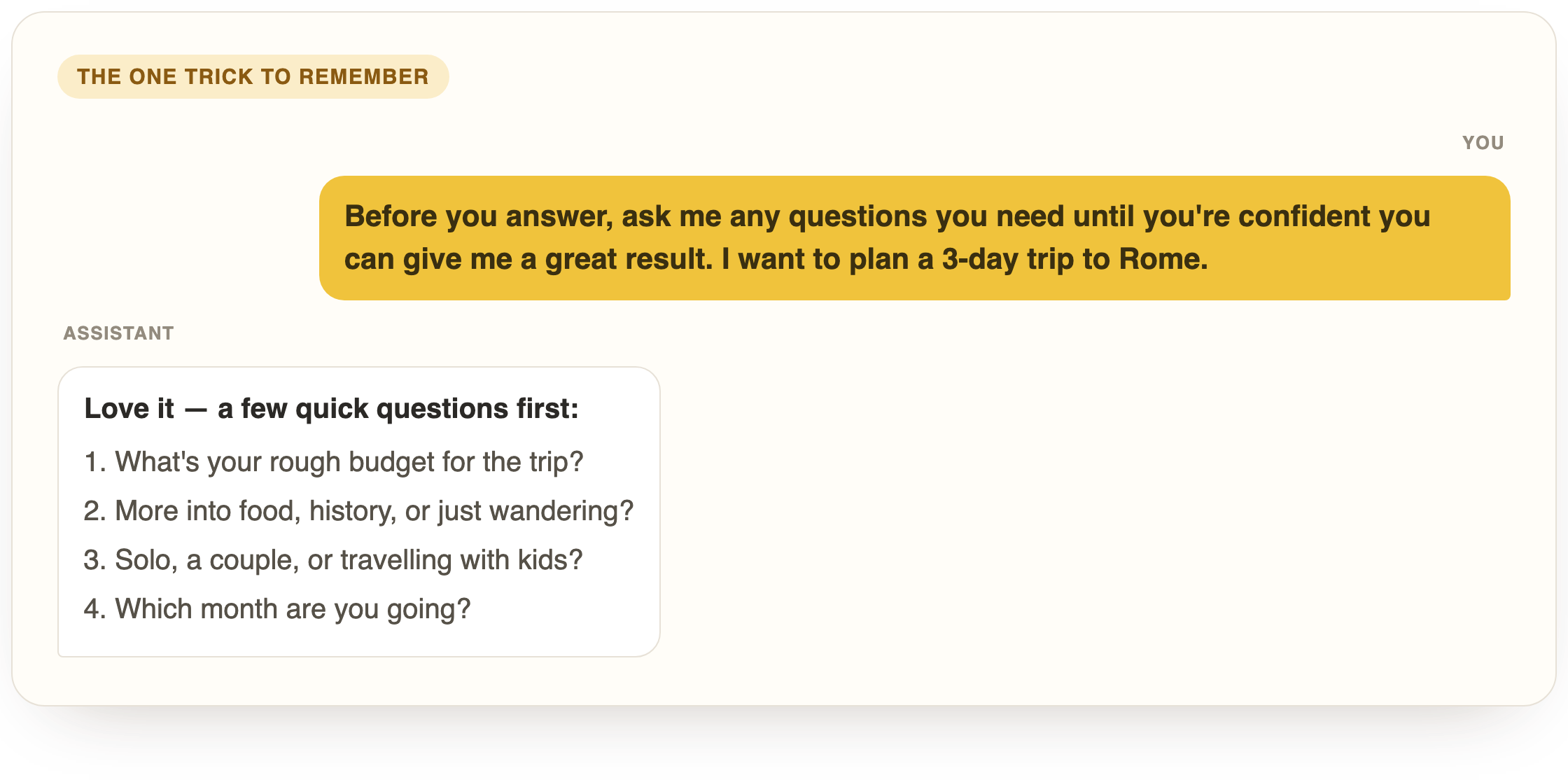
Instead of guessing, ChatGPT asks you the few things it's missing — then nails it on the first real try. It's the closest thing there is to a magic prompt, and it works for anything: a resume, a trip, a tough email, a business idea.
A few small habits that make a big difference
- One topic per chat. Start a fresh chat for a new subject — mixing your dinner plans and your work email in one thread just confuses it.
- Show, don't tell. Paste an email you like and say "write mine in this style." Examples beat instructions every time.
- Let it ask you. When you're not sure what to say, use the interview trick above and let ChatGPT pull the details out of you.
- Correct it out loud. "That's not right — the deadline is in March." Fixing it is normal, and it'll adjust instantly.
What to try in the next five minutes
Don't just read this — go prove it to yourself. Open ChatGPT and redo something you once asked it badly, but this time add who it's for, what you want, and what good looks like. Then follow up once to sharpen it. That's the whole skill.

Ready to go from "it's okay" to "how did I live without this"?
This mindset is the doorway. Inside the club we take you all the way — a guided path from your first good prompt to running real work through AI, at a pace built for people who aren't techy. No jargon, ever.
Questions, answered
Is ChatGPT better than Google now?
They're different tools. Google finds pages that already exist; ChatGPT writes a custom answer or helps you do a task. For "what's the capital of France," Google is faster. For "help me write, plan, or figure something out," ChatGPT wins — as long as you tell it enough.
Do I need to pay for ChatGPT to do this?
No. Everything in this guide works on the free version. The habits matter far more than the plan you're on.
Won't writing a longer request take more time than it saves?
A good request takes about ten extra seconds and saves you three rounds of disappointing answers. It's the highest-return ten seconds in all of AI.
What if I don't even know what to ask for?
Use the interview trick: tell ChatGPT to ask you the questions. You don't need the perfect prompt if you let it pull the details out of you.
Can I really just talk to it in plain, normal language?
Yes. Normal language is perfect — you don't need special words or "prompt engineering." Just be clear, like you're briefing a helpful coworker who can't see what's in your head.
Reading is step one. Doing it is the club.
New skills and guides first, courses as they're released, and a community that answers when you get stuck. $29/month, cancel anytime.

AI changes every week. Stay current in 2 minutes.
Every Monday: what changed in ChatGPT, Claude and Gemini, why it matters, and one thing to try. Free.
Written by Ann Alalouf. Spotted something out of date? Tell us — we keep these current. Published Jul 6, 2026.